AppleScript
(2016 Update: New Link)
Some beginner scripts for use in Apple’s Script Editor. If you’re just starting AppleScript, try figuring out what these scripts do and how they do it, then try running them to see if you were correct.
TextEdit Word Count
tell application "TextEdit"
  activate
  set _t to text of document 1
  set _num to (number of words of _t) as string
  display dialog (_num & " words found")
end tell
TextEdit Character Count
tell application "TextEdit"
  activate
  set _t to text of document 1
  set _num to (number of characters of _t) as string
  set _list to (words of _t)
  set _num2 to 0
  repeat with i from 1 to (count of _list)
    set _item to item i of _list
    set _num2 to _num2 + (number of characters of _item)
  end repeat
  display dialog (_num & " characters found," & return & _num2 & " visible characters found")
end tell
If you have the Script Menu activated, you can access these scripts directly from TextEdit. Here’s how. Open the above scripts in Script Editor, and save them to this folder (Your home folder will be different, of course):
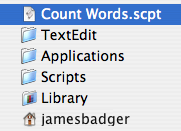
If one or more of these folders don’t already exist, you can create them with the Finder, or from within the Save Dialog Box in Script Editor.
Internet Beat Time
set gmt_time to (time to GMT)
if gmt_time is less than 0 then
  set gmt_time to -gmt_time
end if
set bmt_dif to gmt_time + 3600
--refresh beat time
set here_time to time of (current date)
set bmt_time to here_time + bmt_dif
if bmt_time is greater than or equal to 86400 then
  set bmt_time to bmt_time - 86400
end if
set beat_time to (bmt_time div 86.4)
display dialog "Current Internet Time:" & return & (beat_time) & " Beats"
iTunes Selection Enumerator
-- NOTE: BE VERY CAREFUL WITH THIS SCRIPT.
-- It is very easy to accidently rewrite tag info accidently,
-- and there is no undo. You use it at your own risk. For example,
-- you could accidently delete the track name of every song in
-- your library, or any other field that can be modified
-- through the Info dialog in iTunes.

-- Runs a method of your choice on the selected iTunes songs

on run
  tell application "iTunes"

    set sel_list to selection of window 1


    repeat with i from 1 to (number of items of sel_list)
      set aSong to (item i of sel_list)
      -- aSong is one of the elements of the selection

      -- perform some modifications here, see iTunes AppleScript dictionary,
      -- at iTunes Suite -> track, to see what you could modify.

      -- an option would be to automatically remove ".mp3" from the filenames,
      -- like so:

      set thename to name of aSong

      set toReplace to ".mp3"
      set replaceWith to ""

      if (thename contains toReplace) then
        set OldDelims to AppleScript's text item delimiters
        set AppleScript's text item delimiters to toReplace
        set newText to text items of thename
        set AppleScript's text item delimiters to replaceWith
        set thename to newText as text
        set AppleScript's text item delimiters to OldDelims

        set name of aSong to thename
      end if

      -- other options could include setting 'shuffable', start/finish times,
      -- 'bookmarkable', played date, played count, lyrics, which cannot be
      -- modified by iTunes' Multiple Song Information window.

    end repeat

  end tell

end run