Automator Action
(2016 Update: Links are dead)
Today, I created an automator workflow to cleanup my desktop. I wanted it to run silently in the background, and then give an audible notification of success. I had the option of just doing a simple beep using an AppleScript action, but my alert sound is somewhat boring. So instead, I’ll use an action to play a sound file. Well, there isn’t an action that comes with Automator that does this, without opening another application to play it (iTunes, Quicktime).
Well, doing a search of the web turned up no results, so I decided to create my own action using XCode.
After an hour or so of fiddling around and recalling how to use Cocoa, I created an Automator action to play sounds files that are passed to it.
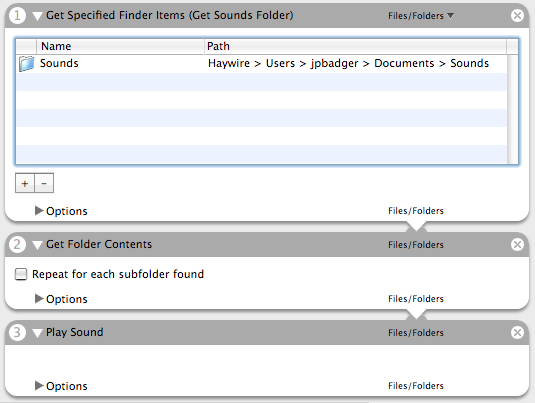
It will only play files with type codes ‘AIFF’, ‘M4A ‘, ‘MPEG’, ‘.WAV’, and ‘ULAW’; and files that contain “.mp3”, “.m4a”, “.wav”, “.au”, and “.aif”. I think that should be safe enough, but I’m sure there is a better solution. I also need to set the output to “Anything”, because nothing is actually returned.
Expect to see it available for download in the next few days. Yeah, you can bug me if I don’t follow up on it!
If you’re looking for more information on Automator, refer to these links.
Automator at Apple
Automator Actions
Automator World
Developer Connection - Working with Automator
Mac Basics: Automator